

Esvon Classifieds - CSV Import


 |
* Price includes single-domain lifetime license and 1 year of free access to new software versions.
|


 Module: CSV Import
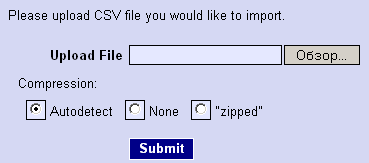
CSV Import module allows you to load / import items into website database
from Comma Separated Value (CSV) files. The module is designed for
admin users only and is accessible from the "Extra Modules" section
in the admin user interface.
Using this tool you can quickly and easily import large quantities of listings into multiple categories (as long as they use the same fieldset) and multiple regions.
This module can help dealers to have their inventory uploaded in bulk. It is well-known that dealers and power sellers can fill your website with a lot of listings, but they can't waste time placing one ad at a time.
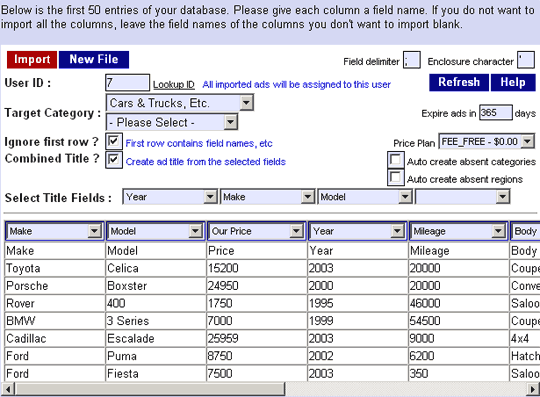
With administrator's assistance dealers can prepare their stock for mass upload into your system. You can provide them with a template (CSV file or Excel form), they fill it in and send to you. If you got it as Excel speadsheet, you export the data from Excel to CSV file. CSV file can be imported in Admin Area, where you can specify user ID, target category (or categories), set imported listings expiration time and assign them to certain price plan. If you want to charge your customers for the imported listings, you can simply invoice them before of after the import (your price may depend on the price plan and the expiration time options).
Let's look at some technical details now.
If your data file doesn't have a field that can be used as listing title, you can use "Combined Title" option to fill title field with data fields combination (e.g. "Year" + "Make" + "Model" for auto listings).
The CSV_Import can also process and import listing images with thumbnails generation during the import process. The photos can be referenced in one of two ways:
1. The [images] column can contain a URL that references the location of the photo on any website.
2. The [images] column can reference the physical location of the photo on your server's hard drive.
For automatic fields matching first row of CSV file should contain the headers that match listing field ids or titles. Also you can manually map the columns via the CSV_Import field selection drop down list.
Also there is an option to create absent categories and regions automatically during bulk upload (CSV file import) process.
Demo:
 Download Demo Now
Free download
Pricing:
 Click to
buy!
Click to
buy!$324.95
Screenshots:
Other modules:
Affiliates moduleAttention Getters module
Auction module
Auto Notify module
Availability module
Banner Ads module
Chat module
Compare Items module
Coupons module
Credits module
Editors module
Instant Messenger module
Maps module
Member Website module
Multi Language module
Multi Category module
OAuth / Facebook Login module
Private Messaging module
Pay Per Click module
Rate Member module
Refine Search module
Regions module
Saved Searches module
Shopping Cart module
Signs and Flyers module
Stock Photo Gallery module
ZIP Code Radius Search module